It is easy to troubleshoot your embed code and work with javascript or iframes
CloudPano tours can be embedded with our javascript embed code or by using an iframe.
The CloudPano embed code can be grabbed from any tour by clicking the "Share" button and copying the embed code.

Our javascript embed code is the default option and follows best-practices for embedding rich media on any site.
Typical embed codes look like this:
<div id="DEMO">
<script type="text/javascript" async data-short="DEMO"
width="100%" height="500px" src="https://app.cloudpano.com/public/shareScript.js">
</script></div>
The above code uses Javascript to insert an iframe onto your page. It will always work and will stay up to date in case we ever update how embedded tours are displayed. You can use it even if your tour uses a whitelabel URL.
Note: You dont have to pay attention to this code if you simply copy it from the "Share" window for your tour. But if you want to know how it works, the data-short and div id properties will be your tour's ID on CloudPano. In the above case, the ID is DEMO - and that tour may be accessed at https://app.cloudpano.com/tours/DEMO .
If for some reason you do not want to use our modern embed code, you can display the tour in an iframe. We don't provide support for this method of embedding, but you can definitely use it:
<iframe id="/tours/DEMO" allow="vr;accelerometer;gyroscope;fullscreen"
allowfullscreen frameborder="0" width="853" height="480"
src="https://app.cloudpano.com/tours/DEMO"></iframe>
To ensure your iframe works properly, ensure you include the code exactly as written above. If some features don't work in your embedded iframe, we have many articles to help you. A common article a lot of people need is: "Why isn't CloudPano Live working in my iframe?" Another article is: "I can't use fullscreen on embedded tours". These articles are only relevant if you are having problems and are writing your own iframe embed code.
Again, you can avoid this headache by just using the javascript embed at the top of this article. Using the iframe embed code is beyond the scope of our support - using an iframe is no different for CloudPano than it is if you were embedding any other website.
Make sure your embed code is structured correctly by testing it on a fresh site. You can paste the embed code into the HTML section of CodePen and see it rendered.
Here's an example:
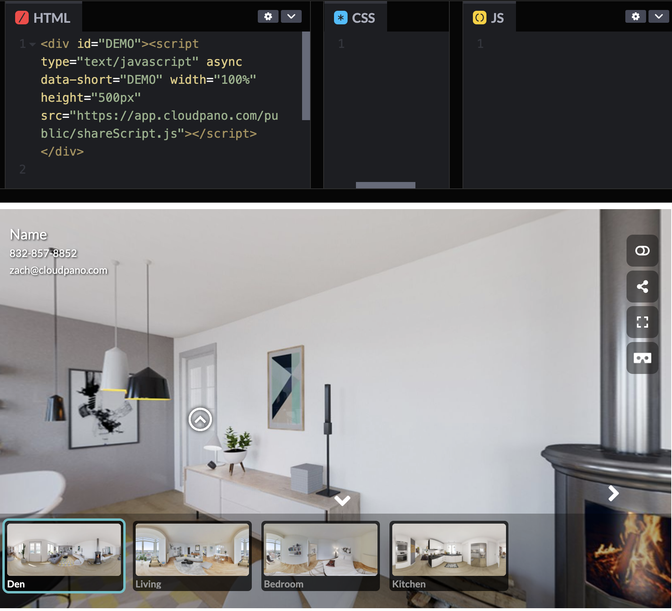
If it doesn't work on CodePen, there is a problem with the code. Double check the embed code closely and make sure you have " wrapping around all your strings. For example,
src=https://app.cloudpano.com/public/shareScript.jswould be incorrect, but
src="https://app.cloudpano.com/public/shareScript.js"will work.